designops
designops
processes
processes
|
|
efficiency
efficiency
|
|
optimisation
optimisation
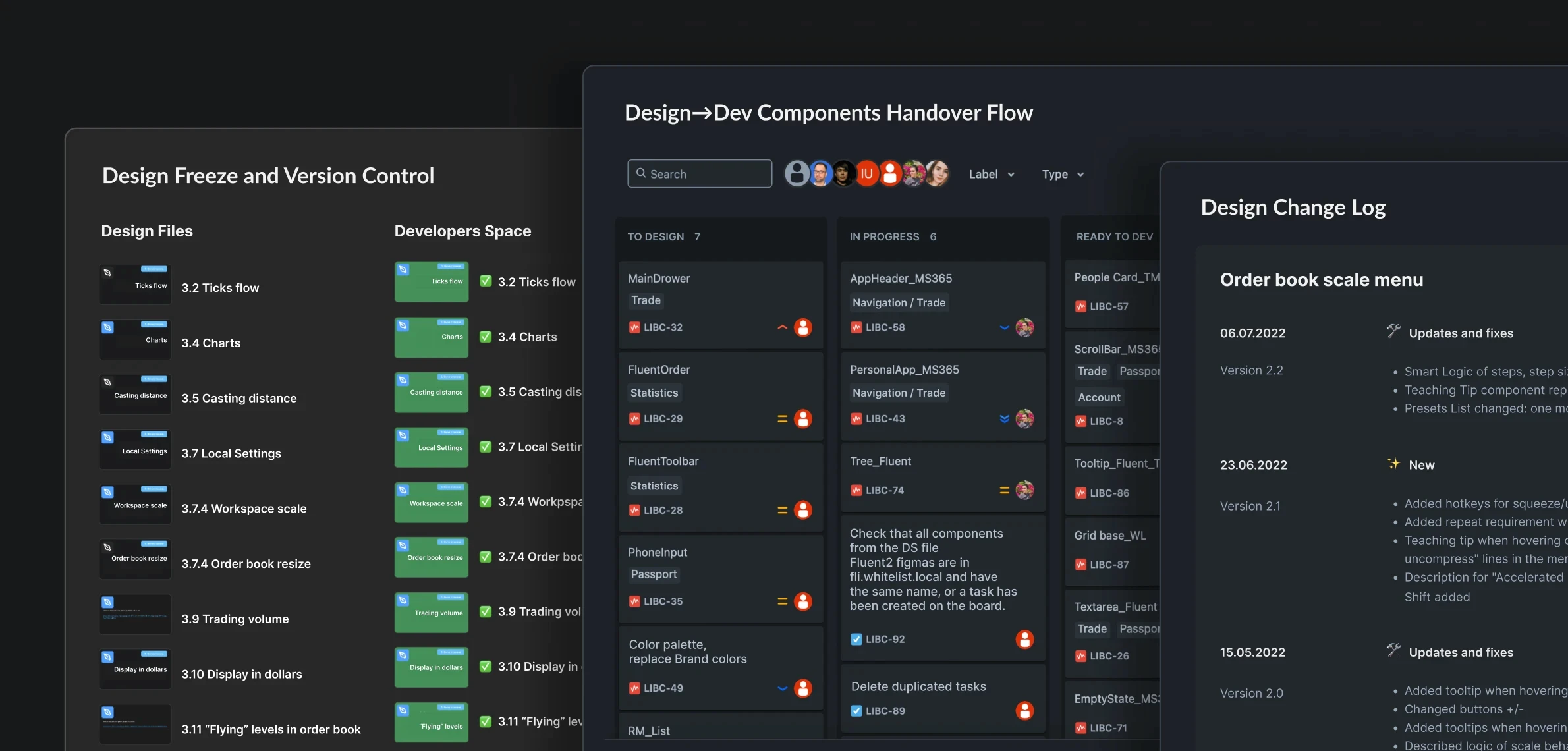
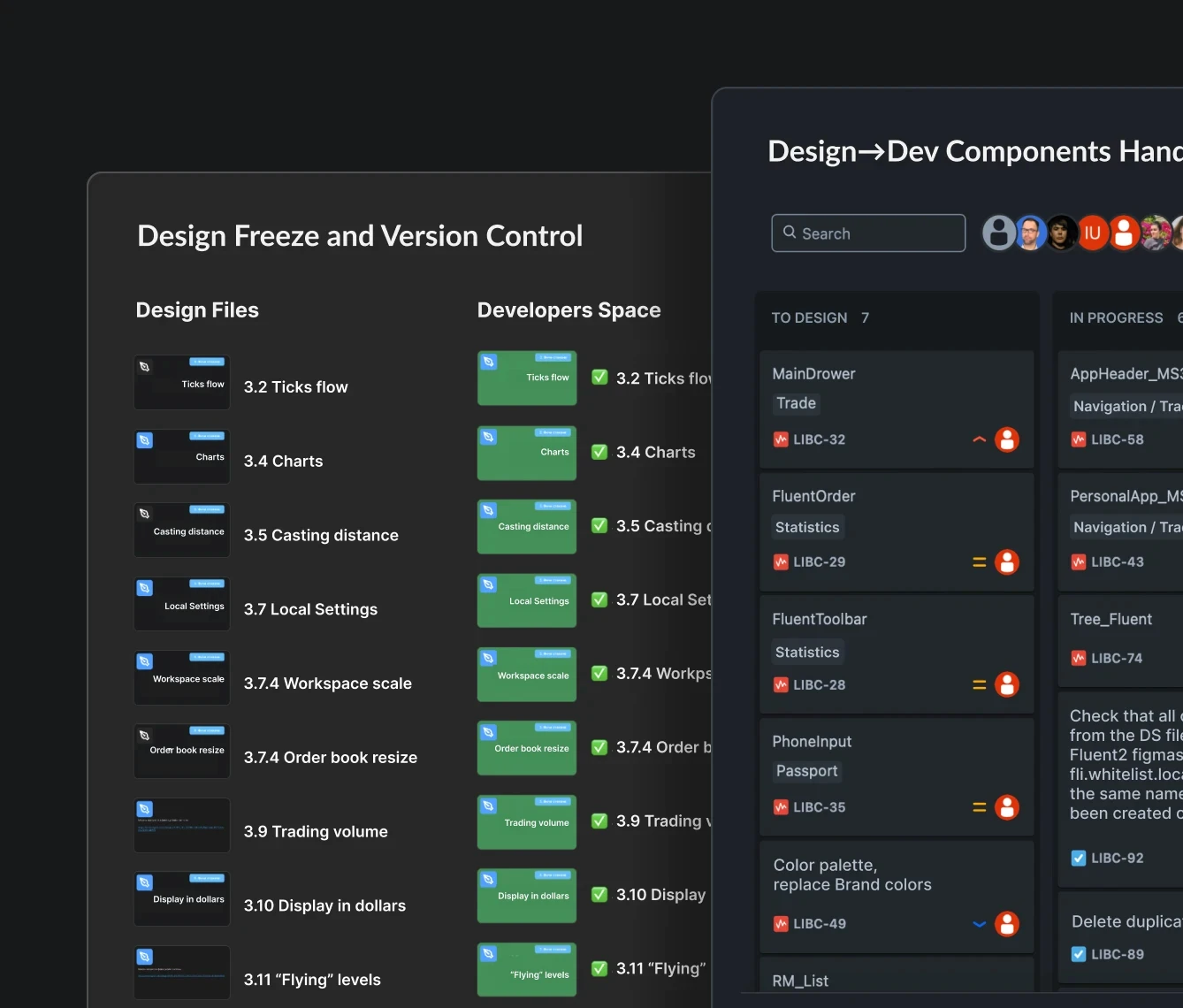
change log
change log
Process type:
Cross-Functional
Cross-Functional
applied in projects:
Digital Ecosystems | Tango Live | Epharmacy | Punch | Scalpee
▪ Digital Ecosystems
▪ Tango Live
▪ Epharmacy
▪ Punch
▪ Scalpee
Problem
Products functionality constantly evolves. Without a clear change history and update log, issues arise: excessive communications and questions at every stage – from presenting new iterations to implementation.
Showing only changed fragments in new layout versions (without full screens and flows) prompts QA to ask countless questions about unchanged parts. New elements often depend on the old ones.
Fully replacing layouts isn’t better: devs and QA waste hours spotting differences like “find the 10 changes” game. Figma’s comparison tools can help, but it’s still a time waste.
Another problem is the next version may come to design, adding new layouts, while previous version is still in testing. Updating layouts or components disrupts the process.
Products functionality constantly evolves. Without a clear change history and update log, issues arise: excessive communications and questions at every stage – from presenting new iterations to implementation.
Showing only changed fragments in new layout versions (without full screens and flows) prompts QA to ask countless questions about unchanged parts. New elements often depend on the old ones.
Fully replacing layouts isn’t better: devs and QA waste hours spotting differences like “find the 10 changes” game. Figma’s comparison tools can help, but it’s still a time waste.
Another problem is the next version may come to design, adding new layouts, while previous version is still in testing. Updating layouts or components disrupts the process.
Solution
Figma’s branching feature could help. However, Figma expenses would instantly multiply by up to 7x, as it requires Organization or Enterprise plan, which are much more expensive. Plus, it adds complexity for non-designers involved in the process. So here comes change log.
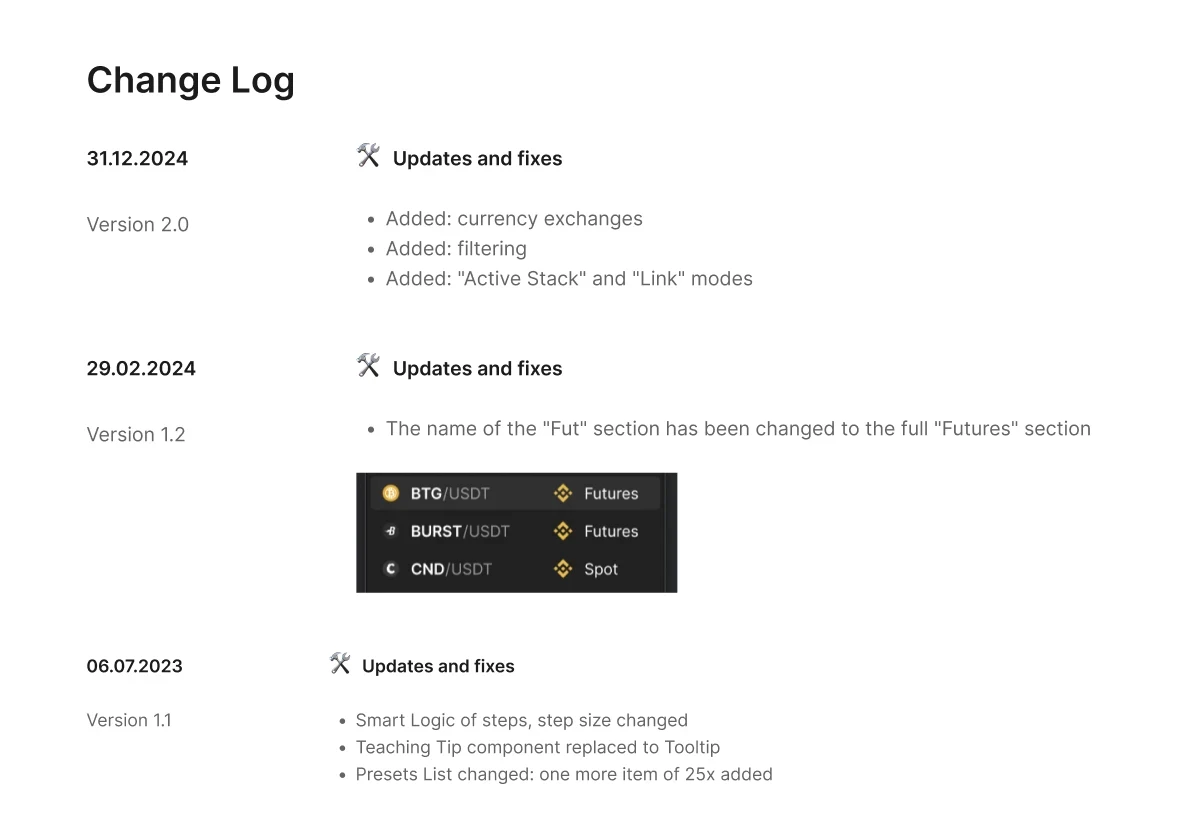
■ Fix clear versions in iterations and design, starting from the stage of defining primary requirements for the new iteration, while also recording version numbers in task trackers and planning.
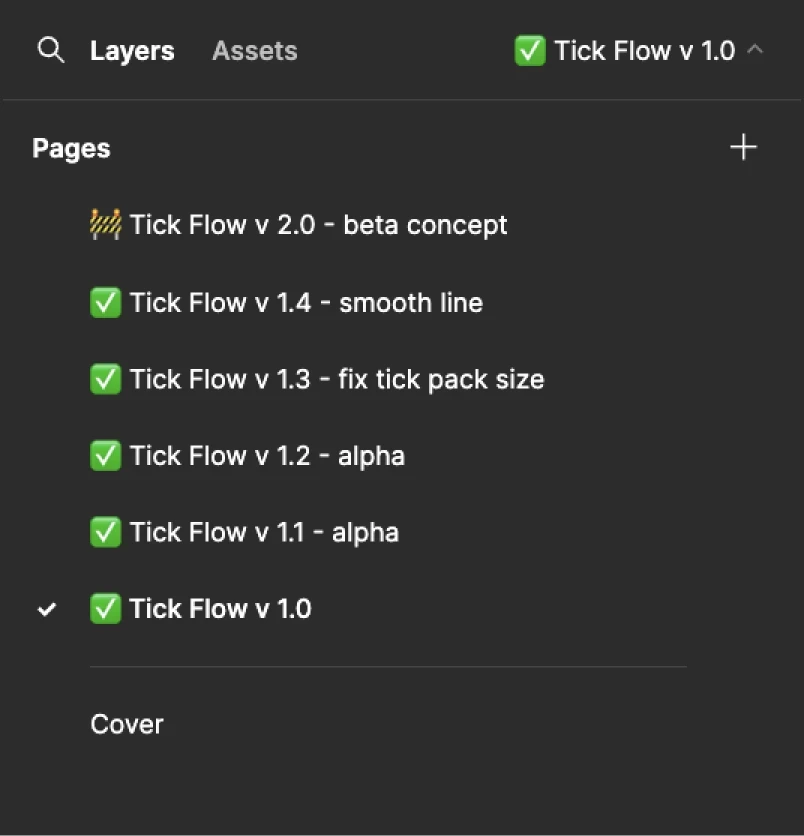
■ Store the versions in the pages of files, provided that the structure is organized in the format file = feature.
■ From version to version, all old parts of the layouts are fully duplicated, and changes are added to them.
■ Add inks to specific frames of the page in each item. Links to frames greatly help developers and QA quickly see the changes.
Figma’s branching feature could help. However, Figma expenses would instantly multiply by up to 7x, as it requires Organization or Enterprise plan, which are much more expensive. Plus, it adds complexity for non-designers involved in the process. So here comes change log.
■ Fix clear versions in iterations and design, starting from the stage of defining primary requirements for the new iteration, while also recording version numbers in task trackers and planning.
■ Store the versions in the pages of files, provided that the structure is organized in the format file = feature.
■ From version to version, all old parts of the layouts are fully duplicated, and changes are added to them.
■ Add inks to specific frames of the page in each item. Links to frames greatly help developers and QA quickly see the changes.
Impact
As a result, an extra hour of a designer's time on detailed versioning documentation saves time for many team members: PM, PrdM, Dev, QA, as well as other or new designers who will take on the feature.
Significant reduction in the number of interruptions and bugs in the design-development-QA cycle. Absence of unnecessary communication. A transparent and easily readable history of features. Much easier onboarding of other designers into the feature. Fewer conflicts and chaos in the cross-functional team. Clearer planning and task tracking.
As a result, an extra hour of a designer's time on detailed versioning documentation saves time for many team members: PM, PrdM, Dev, QA, as well as other or new designers who will take on the feature.
Significant reduction in the number of interruptions and bugs in the design-development-QA cycle. Absence of unnecessary communication. A transparent and easily readable history of features. Much easier onboarding of other designers into the feature. Fewer conflicts and chaos in the cross-functional team. Clearer planning and task tracking.
design freeze
design freeze
Process type:
Cross-Functional
Cross-Functional
applied in projects:
Digital Ecosystems | Tango Live | Punch | Scalpee
▪ Digital Ecosystems
▪ Tango Live
▪ Epharmacy
▪ Punch
▪ Scalpee
Problem
When handing off Figma files to development, a key issue arises with library updates—similar to “code freeze,” we need a “design freeze.”
Here’s the core problem: If design work continues in the same file passed to devs, library updates can alter layouts either during development or after it’s done but before QA testing.
As a result, QA sees one thing in the build but something else in the designs, files a bug—despite devs implementing exactly what’s shown. The layouts simply changed due to the library update, or even mid-development.
When handing off Figma files to development, a key issue arises with library updates—similar to “code freeze,” we need a “design freeze.”
Here’s the core problem: If design work continues in the same file passed to devs, library updates can alter layouts either during development or after it’s done but before QA testing.
As a result, QA sees one thing in the build but something else in the designs, files a bug—despite devs implementing exactly what’s shown. The layouts simply changed due to the library update, or even mid-development.
Solution
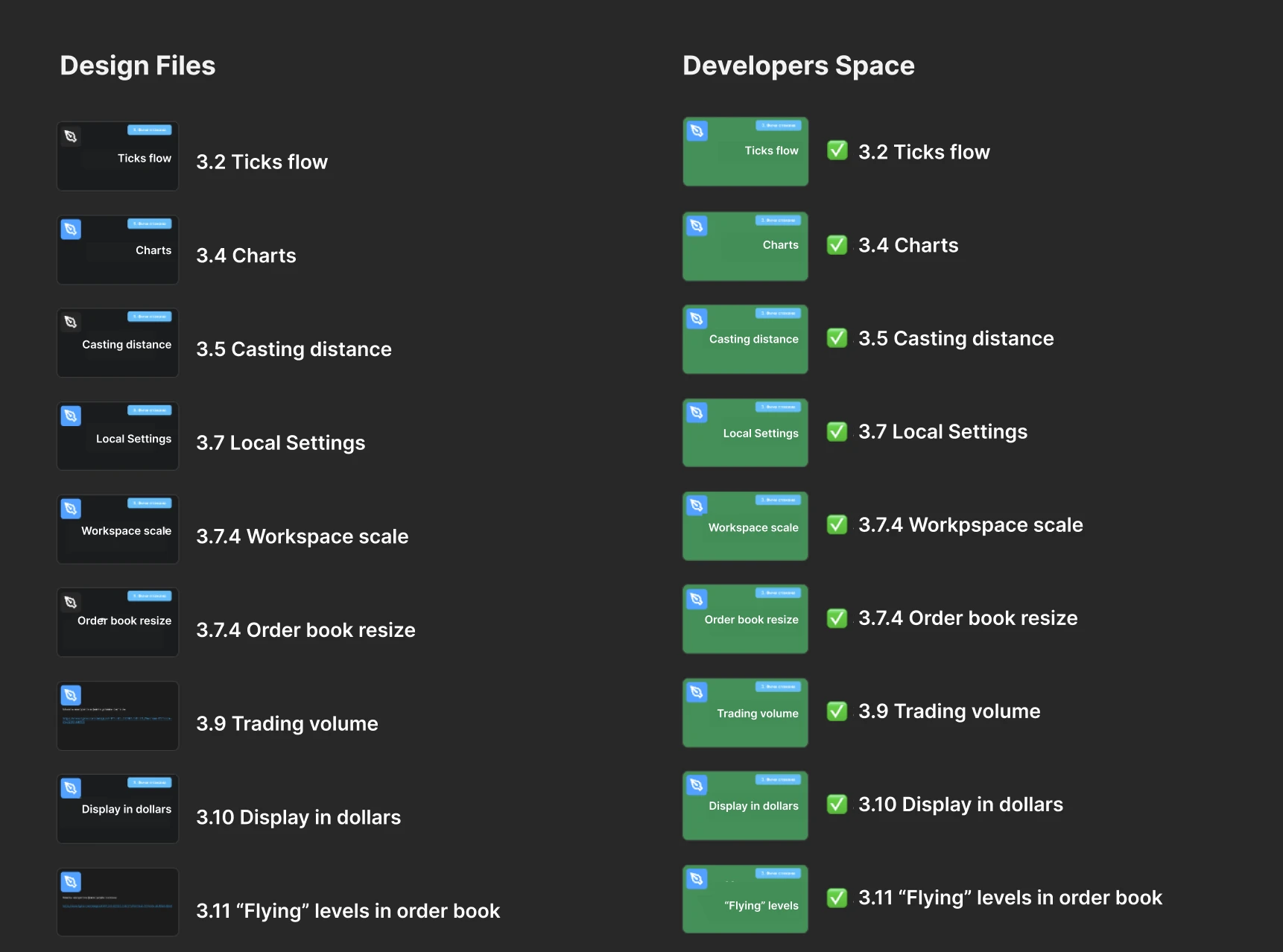
Create a separate DevSpace project with copies of the layout files and pages. DevSpace files are not linked to libraries.
This freezes the layouts and disconnecting file from library and design changes. Styles and components still display but don’t auto-sync.
And yes, Figma branching works only on Organization or Enterprise plans. Beyond the price, it has key disadvantages:
■ Downgrading plan or new project breaks the workflow.
■ Branches are harder to grasp than DevSpace (a simple design space clone), especially for PMs and devs who use DevSpace too.
■ DevSpace allows granular permissions (e.g., block design editing of the version), unlike branches.
For massive orgs with complex files, strict processes, and big teams for oversight, branches work best. For companies under 500 total headcount, design freeze is much simpler and more efficient.
Create a separate DevSpace project with copies of the layout files and pages. DevSpace files are not linked to libraries.
This freezes the layouts and disconnecting file from library and design changes. Styles and components still display but don’t auto-sync.
And yes, Figma branching works only on Organization or Enterprise plans. Beyond the price, it has key disadvantages:
■ Downgrading plan or new project breaks the workflow.
■ Branches are harder to grasp than DevSpace (a simple design space clone), especially for PMs and devs who use DevSpace too.
■ DevSpace allows granular permissions (e.g., block design editing of the version), unlike branches.
For massive orgs with complex files, strict processes, and big teams for oversight, branches work best. For companies under 500 total headcount, design freeze is much simpler and more efficient.
Impact
No version conflicts or ambiguities in layouts during the production cycle. No extra communication needed. Designers freely update libraries and files without worrying about handed-off designs.
No version conflicts or ambiguities in layouts during the production cycle. No extra communication needed. Designers freely update libraries and files without worrying about handed-off designs.
Feature review
Feature review
Process type:
Cross-Team
Cross-Team
applied in projects:
Tango Live | Epharmacy | Punch | Scalpee
▪ Digital Ecosystems
▪ Tango Live
▪ Epharmacy
▪ Punch
▪ Scalpee
Problem
The feature is imagined, designed, documented, prepared for development, and handed off to engineering.
Development stage raises numerous questions:
■ Technical challenges and implementation blockers
■ Unexpected effort estimates
■ Valid product/feature clarifications
■ Improvement suggestions
QA stage uncovers more:
■ Unconsidered scenarios
■ Incomplete flows
■ Missing edge cases
Release stage brings team-wide questions:
■ Why does this feature exist?
■ Why is it implemented this way?
Result: Chaos
■ Unplanned communication and back-and-forth
■ Repeated questions from dev, QA, and other PMs
■ One more full or partial release cycle
■ Chaotic processes and broken planning
■ Inter-team negativity
The feature is imagined, designed, documented, prepared for development, and handed off to engineering.
Development stage raises numerous questions:
■ Technical challenges and implementation blockers
■ Unexpected effort estimates
■ Valid product/feature clarifications
■ Improvement suggestions
QA stage uncovers more:
■ Unconsidered scenarios
■ Incomplete flows
■ Missing edge cases
Release stage brings team-wide questions:
■ Why does this feature exist?
■ Why is it implemented this way?
Result: Chaos
■ Unplanned communication and back-and-forth
■ Repeated questions from dev, QA, and other PMs
■ One more full or partial release cycle
■ Chaotic processes and broken planning
■ Inter-team negativity
Solution
Present the feature functionality, mockups, and prototypes to all participants in the release cycle and interested team members before handing it over to development.
Key points:
■ Include a mandatory feature presentation stage in the workflow.
■ Prepare a link to the mockups and send it to participants a bit in advance before the meeting so they can prepare questions.
■ Do not prepare detailed scenarios and UI for handover to development (do not document them) to avoid rework if changes are needed. Only main scenarios.
■ Invite all team members, and for flagship features – leaders/representatives of departments. This helps resolve many questions in advance, get valuable advice, ideas, and edge cases, and allows other participants to roughly understand the scope of work and potential technical challenges.
■ Prepare a cohesive User Story, since meeting participants are not immersed in the feature.
■ If there is no quick answer to a question – state it openly, log the issue, do not try to solve the design task during the meeting to avoid wasting the team’s valuable time. Work out the solution afterward and present it again.
During the feature presentation, all participants can ask questions, discuss the development cost of solutions, clarify if certain scenarios are included, etc.
After the feature presentation, the product manager and designer proceeds to another design cycle, or, if there are no questions, to the preparation stage for handover to development and continues according to the workflow.
Present the feature functionality, mockups, and prototypes to all participants in the release cycle and interested team members before handing it over to development.
Key points:
■ Include a mandatory feature presentation stage in the workflow.
■ Prepare a link to the mockups and send it to participants a bit in advance before the meeting so they can prepare questions.
■ Do not prepare detailed scenarios and UI for handover to development (do not document them) to avoid rework if changes are needed. Only main scenarios.
■ Invite all team members, and for flagship features – leaders/representatives of departments. This helps resolve many questions in advance, get valuable advice, ideas, and edge cases, and allows other participants to roughly understand the scope of work and potential technical challenges.
■ Prepare a cohesive User Story, since meeting participants are not immersed in the feature.
■ If there is no quick answer to a question – state it openly, log the issue, do not try to solve the design task during the meeting to avoid wasting the team’s valuable time. Work out the solution afterward and present it again.
During the feature presentation, all participants can ask questions, discuss the development cost of solutions, clarify if certain scenarios are included, etc.
After the feature presentation, the product manager and designer proceeds to another design cycle, or, if there are no questions, to the preparation stage for handover to development and continues according to the workflow.
Impact
■ Potential edge cases identified and accounted for
■ New ideas received, functionality improved or modified
■ Technical challenges and approximate development costs identified in advance
■ All directions/teams/leaders involved in the feature
■ Reduced release cycle fix costs, refinements only within design
■ Improved team communication: development sees that UX decisions are well-reasoned, design understands the reasons for technical blockers and development costs, etc.
■ Potential edge cases identified and accounted for
■ New ideas received, functionality improved or modified
■ Technical challenges and approximate development costs identified in advance
■ All directions/teams/leaders involved in the feature
■ Reduced release cycle fix costs, refinements only within design
■ Improved team communication: development sees that UX decisions are well-reasoned, design understands the reasons for technical blockers and development costs, etc.
design system ops
design system ops
Process type:
Design-Dev
Design-Dev
applied in projects:
Scalpee
▪ Digital Ecosystems
▪ Tango Live
▪ Epharmacy
▪ Punch
▪ Scalpee
Problem
The problem was is a third-party design system Fluent 2 that needed to be integrated into our design system and product. Fluent 2 code for the Web version is only available on React, while our dev environment is Vue 3, and porting the code is not feasible.
We already had an existing internal design system with tokens, styles, and a partially ready Storybook, into which Fluent 2 components need to be integrated. Plus, we needed a process for updating component versions in collaboration between designers and front-end development teams.
The decision was to recreate Fluent 2 components manually in Vue 3 environment using our DS tokens and styles, and then to merge the Storybooks.
To complete this without friction, a process and workflow is required.
The problem was is a third-party design system Fluent 2 that needed to be integrated into our design system and product. Fluent 2 code for the Web version is only available on React, while our dev environment is Vue 3, and porting the code is not feasible.
We already had an existing internal design system with tokens, styles, and a partially ready Storybook, into which Fluent 2 components need to be integrated. Plus, we needed a process for updating component versions in collaboration between designers and front-end development teams.
The decision was to recreate Fluent 2 components manually in Vue 3 environment using our DS tokens and styles, and then to merge the Storybooks.
To complete this without friction, a process and workflow is required.
Solution
■ I wrote a justification for the need for resources to separate design system work into a dedicated process with specific owners on both design and development sides. The main arguments are calculations of the benefits from having a process and a mature design system as the outcome. The rough ROI calculation exceeded 300% over a one-year period, with even greater returns afterward.
■ We hired a dedicated designer with design system building skills on a project-based, part-time contract, since the current workload is not high and the project has a finite timeline. This option was chosen due to the lack of design system skills in this project’s team within the company, while pulling designers from other projects would be too expensive and disrupt those projects’ plans.
■ In our library file, I created Variables fully matching the names and style characteristics of the Fluent 2 library. When transferring a component from Fluent to our system, all styles were replaced with ours. This way, we got ready-made, assembled, and thoroughly documented components, but with our own styles, text fonts, and palette.
■ I created a guide for converting components from one design system to another.
■ With the project manager, designer, and developer responsible for the project, we agreed on the stages:
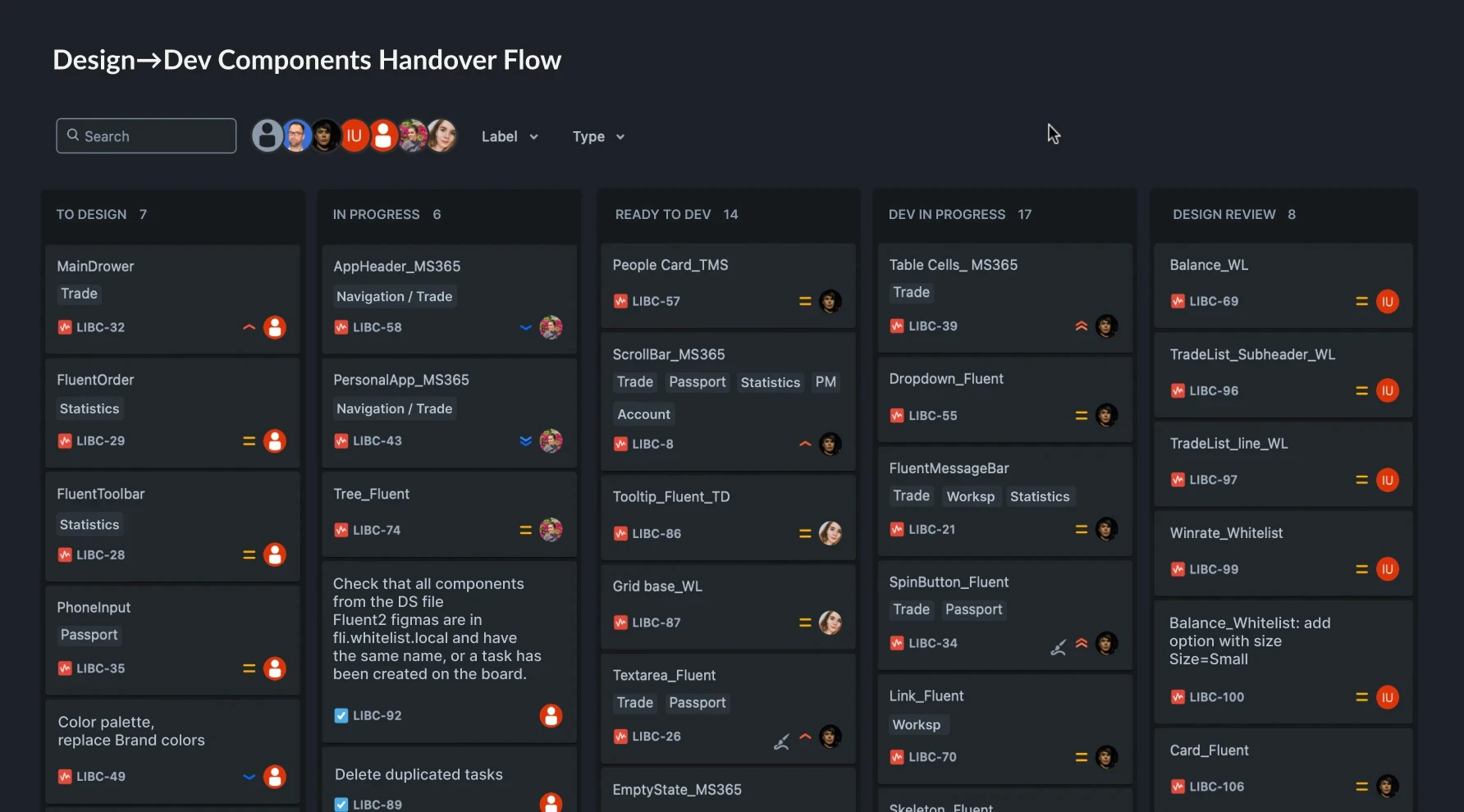
Stage 1: Tasks for design and documentation of Fluent 2 component integration specifics into our project, plus full documentation for entirely new components.
Stage 2: Design task assigned to a specific designer and taken into work.
Stage 3: Once the component is ready, it is sent for review to the design system owner designer. If needed, the component is sent back for revisions.
Stage 3: Component is passed to the development “backlog.”
Stage 4: The design system developer assigns individual components to available developers for implementation. Upon code completion, the developer attaches a Storybook link for that component to the task.
Stage 5: Design review of the component to verify implementation.
Stage 6: Optional stage for fixing implementation bugs. Can be skipped if the component is fine. A separate stage is needed for clear separation of new tasks and debugging tasks.
Done: Component moves to the “ready” section, where their list can be reviewed.
When a new version of a component emerges, it goes through the same cycle, ensuring high implementation quality and version control.
■ I wrote a justification for the need for resources to separate design system work into a dedicated process with specific owners on both design and development sides. The main arguments are calculations of the benefits from having a process and a mature design system as the outcome. The rough ROI calculation exceeded 300% over a one-year period, with even greater returns afterward.
■ We hired a dedicated designer with design system building skills on a project-based, part-time contract, since the current workload is not high and the project has a finite timeline. This option was chosen due to the lack of design system skills in this project’s team within the company, while pulling designers from other projects would be too expensive and disrupt those projects’ plans.
■ In our library file, I created Variables fully matching the names and style characteristics of the Fluent 2 library. When transferring a component from Fluent to our system, all styles were replaced with ours. This way, we got ready-made, assembled, and thoroughly documented components, but with our own styles, text fonts, and palette.
■ I created a guide for converting components from one design system to another.
■ With the project manager, designer, and developer responsible for the project, we agreed on the stages:
Stage 1: Tasks for design and documentation of Fluent 2 component integration specifics into our project, plus full documentation for entirely new components.
Stage 2: Design task assigned to a specific designer and taken into work.
Stage 3: Once the component is ready, it is sent for review to the design system owner designer. If needed, the component is sent back for revisions.
Stage 3: Component is passed to the development “backlog.”
Stage 4: The design system developer assigns individual components to available developers for implementation. Upon code completion, the developer attaches a Storybook link for that component to the task.
Stage 5: Design review of the component to verify implementation.
Stage 6: Optional stage for fixing implementation bugs. Can be skipped if the component is fine. A separate stage is needed for clear separation of new tasks and debugging tasks.
Done: Component moves to the “ready” section, where their list can be reviewed.
When a new version of a component emerges, it goes through the same cycle, ensuring high implementation quality and version control.
Impact
In a team with almost any design system experience, within 2 months of part-time engagement, several designers and developers created a library and a well-populated Storybook with thoroughly documented components based on our tokens, established a streamlined process, and, most importantly, achieved 20-30% savings in frontend development costs for features.
In a team with almost any design system experience, within 2 months of part-time engagement, several designers and developers created a library and a well-populated Storybook with thoroughly documented components based on our tokens, established a streamlined process, and, most importantly, achieved 20-30% savings in frontend development costs for features.
Dispute Resolution Flow
Dispute Resolution Flow
Process type:
Design Internal | Cross-Functional
Design Internal | Cross-Functional
applied in projects:
Tango Live | Punch | Epharmacy
▪ Digital Ecosystems
▪ Tango Live
▪ Epharmacy
▪ Punch
▪ Scalpee
Problem
A cross-functional cell consisting of a product manager and a designer, who have disagreements regarding the design solution for a certain feature, and they cannot reach an agreement.
Negativity emerges in communication, and arguments devolve into abstract, subjective, and emotional ones.
A cross-functional cell consisting of a product manager and a designer, who have disagreements regarding the design solution for a certain feature, and they cannot reach an agreement.
Negativity emerges in communication, and arguments devolve into abstract, subjective, and emotional ones.
Solution
Develop and adopt an action algorithm for such situations:
■ If the designer and product manager in the cell cannot reach a consensus on any issue, the question is escalated to the team leads.
■ If the team leads cannot agree among themselves, the issue is escalated to department/division heads.
■ And further up to the CEO if needed.
In practice, the issue rarely even reaches department heads, as team leads’ competencies and prioritization allow for very quick resolution.
Most importantly, the existence of this known scheme strongly motivates all dispute participants to resolve issues at their level using the most objective and competent arguments, without escalating simple questions—which would demonstrate low communication skills and weak arguments in their position.
At the same time, complex or ambiguous questions do not go unresolved, and decisions are not made by guesswork.
As the design lead, I ask designers to defer to product managers in cases where, in the designer’s judgment, the disputed item’s potential impact on UX or metrics is insignificant. And to use such concessions as an additional argument when it truly seems important to persuade the product manager toward their option.
Develop and adopt an action algorithm for such situations:
■ If the designer and product manager in the cell cannot reach a consensus on any issue, the question is escalated to the team leads.
■ If the team leads cannot agree among themselves, the issue is escalated to department/division heads.
■ And further up to the CEO if needed.
In practice, the issue rarely even reaches department heads, as team leads’ competencies and prioritization allow for very quick resolution.
Most importantly, the existence of this known scheme strongly motivates all dispute participants to resolve issues at their level using the most objective and competent arguments, without escalating simple questions—which would demonstrate low communication skills and weak arguments in their position.
At the same time, complex or ambiguous questions do not go unresolved, and decisions are not made by guesswork.
As the design lead, I ask designers to defer to product managers in cases where, in the designer’s judgment, the disputed item’s potential impact on UX or metrics is insignificant. And to use such concessions as an additional argument when it truly seems important to persuade the product manager toward their option.
Impact
UX/UI decisions in complex situations become more competent. In simple situations, communication volume decreases, and leads are less distracted. Communication within the cell becomes more transparent. Designers and product managers have less need to use non-objective or irrelevant arguments.
UX/UI decisions in complex situations become more competent. In simple situations, communication volume decreases, and leads are less distracted. Communication within the cell becomes more transparent. Designers and product managers have less need to use non-objective or irrelevant arguments.
impact
impact
Properly structured processes and workflows can have a significant impact on efficiency, product quality, in-team relationships, and business outcomes. Especially processes that have been successfully tested across multiple projects and proven their value. Like any tool, they should be adapted to meet the specific project requirements and team structure to achieve optimal results. Processes work only when they serve the goals, not the process itself.
Properly structured processes and workflows can have a significant impact on efficiency, product quality, in-team relationships, and business outcomes. Especially processes that have been successfully tested across multiple projects and proven their value. Like any tool, they should be adapted to meet the specific project requirements and team structure to achieve optimal results. Processes work only when they serve the goals, not the process itself.